
Audi Q7: Overview - Bosch Generator from 2001
 Note
Note
The generators were implemented as a running change.
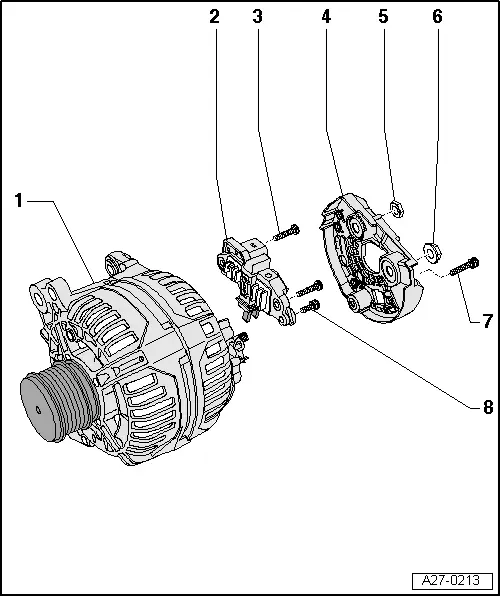
1 - Generator
2 - Voltage Regulator
- Removing and installing. Refer to → Chapter "Voltage Regulator, Bosch Generator from 2001, Removing and Installing".
- Carbon brushes, checking. Refer to → Chapter "Carbon Brushes, Checking, All Bosch Generators from 2001"
3 - Bolt
- 2.5 Nm
4 - Cover
5 - Nut
- 12 Nm
6 - Nut
- 30 Nm
7 - Bolt
- 3 Nm
8 - Bolt
- 1.5 Nm
Voltage Regulator, Bosch Generator from 2001, Removing and Installing
Removing
- Remove the generator. Refer to → Electrical Equipment; Rep. Gr.27; Generator; Generator, Removing and Installing.
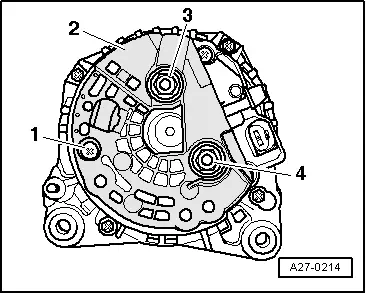
- Remove the bolt -1- and the nuts -3- and -4-.
- Remove the cover -2- on the rear side of the generator.
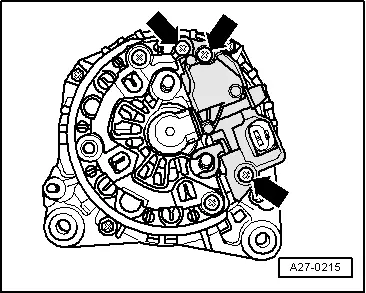
- Remove the bolts -arrows-.
- Remove voltage regulator.
Installing
- When installing the voltage regulator, make sure the carbon brushes rest correctly on the slip rings.
Install in reverse order of removal, observing the following:
- Install the generator. Refer to → Electrical Equipment; Rep. Gr.27; Generator; Generator, Removing and Installing.
- Tightening specification. Refer to → Chapter "Overview - Bosch Generator from 2001".

